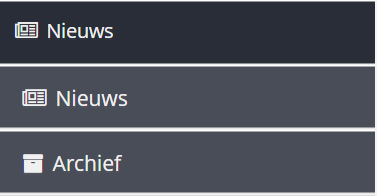
I am probably approaching this the wrong way but when trying to modify the styling of the accordeon component I seem to stick with some borders although none of the elements in the HTML has borders defined. Very strange.
This is the style override that I apply:
.v-accordion{
	background-color: #292d38;
	border-radius:0px;
	border:0px;
	-webkit-box-shadow: none;
}

.v-accordion-item-caption>.v-caption {
	color: #f0f0f0;
	height: 43px;
    padding-top: 6px;
	border: 0;
	border-radius: 0!important;
The HTML for the accordeon then contains this:
<div class="v-accordion-item v-accordion-item-first v-accordion-item-open" style="width: 100%; height: 130px;"><div class="v-accordion-item-caption"><div class="v-caption"><span class="v-icon FontAwesome">?</span><div class="v-captiontext">Nieuws</div></div></div><div class="v-accordion-item-content v-scrollable" style="top: 43px; left: 0px; height: 87px;"><div tabindex="-1" class="v-verticallayout v-layout v-vertical v-widget v-has-width" style="width: 100%;"><div class="v-slot v-slot-menuLevel1Btn v-slot-icon"><div tabindex="0" role="button" class="v-button v-widget menuLevel1Btn v-button-menuLevel1Btn icon v-button-icon v-has-width v-has-height" style="width: 100%; height: 43px;"><span class="v-button-wrap"><span class="v-icon FontAwesome">?</span><span class="v-button-caption">Nieuws</span></span></div></div><div class="v-slot v-slot-menuLevel1Btn v-slot-icon"><div tabindex="0" role="button" class="v-button v-widget menuLevel1Btn v-button-menuLevel1Btn icon v-button-icon v-has-width v-has-height" style="width: 100%; height: 43px;"><span class="v-button-wrap"><span class="v-icon FontAwesome">?</span><span class="v-button-caption">Archief</span></span></div></div></div></div></div>
Attached is the result that still contains some borders.
Very strange - what am I doing wrong?
Is there a better way that removes the borders as well?