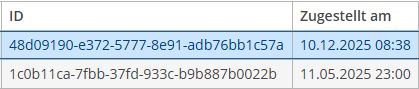
The entities are displayed in a browse screen with a standard group table and no specific formatter for the attribute.
There are two ways how entities are created within my project:
through user interface
by import from a file
The issue i have is that the mentioned attribute in the table are displayed different regarding the timezone of the current user. Here are two example data:
entity created by user interface with ‘zugestelltAm’ set to ‘2025-12-10 08:38’. The same value is stored in the database and will be shown on the browse screen.
entity imported from file with ‘zugestelltAm’ set to ‘2025-05-12 00:00’. The same value is stored in the database but on the browse screen the timezone of the current user takes effect. In this example the timezone is +1 so the displayed value is ‘2025-05-11 23:00’.
Both entities are created by the default admin user.
What is timezone of the application server (-Duser.timezone parameter, if you use it on start, or server time zone)?
Is it the same as time zone of your “current user”?
Have you looked how the date value looks like in the database in both cases, using SQL client?
BTW it is unlikely that “The same value is stored in the database” would be displayed differently in UI of the same user with the same timezone setting.
The most probable case is that in second case the value inserted to DB is different, so you need to transform the date-time value to user’s time zone before inserting it to database.
It may be caused by the daylight time saving changes…
10.12 is winter time.
11.05 is summer time.
The following might help:
Check timezone settings between database / application server / user settings.
Note that “DST + 1” is not the same as “Europe/Amsterdam”. The latter one implies moving clock twice a year, while first one does not.
Use column type in the DB that stores timezone, if it is available. E.g. “timestamptz” is supported in PostgreSQL and Oracle.
Daylight time saving changes was the reason for this behaviour.
When i changed the date for the second example to today the time is shown as 00:00.
We are planing to use column type that stores timezone in the future. For a quick solution we will use the annotation @IgnoreUserTimeZone since our application is only used in one timezone.