mabutabee
August 8, 2018, 2:21pm
#1
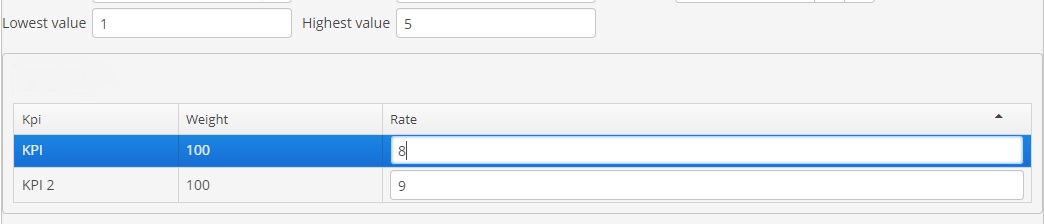
I have an editable table , with an editable column rate of type int.
wwnjj13
August 8, 2018, 5:21pm
#3
It seems that to add a validator, it needs to be a generated column that returns a TextField. That TextField can have a validator assigned to it.
mabutabee
August 9, 2018, 9:30am
#4
Could you help with a sample code maybe
Thank you
tsarev
August 13, 2018, 1:12pm
#5
Hello @mabutabee
As @wwnjj13 said you can solve your problem with generated column:
itemsTable.addGeneratedColumn("editableRate", entity -> {
    TextField tf = componentsFactory.createComponent(TextField.class);

    tf.setValue(entity.getValue("rate"));
    tf.addValueChangeListener(e -> {
        if (e.getValue() == null) {
            showNotification("Rate cannot be null", NotificationType.TRAY);
            tf.setValue(e.getPrevValue());
            return;
        }

        int intVal;
        try {
            intVal = Integer.parseInt(((String) e.getValue()));
        } catch (NumberFormatException ex) {
            showNotification("Rate should be integer", NotificationType.TRAY);
            tf.setValue(e.getPrevValue());
            return;
        }

        if (intVal < 1 || intVal > 5) {
            showNotification("Rate should be between 1 and 5", NotificationType.TRAY);
            tf.setValue(e.getPrevValue());
            return;
        }

        entity.setRate(intVal);
    });

    return tf;
});
Here is a code for sample:
editable-table-col-validator.zip (73.1 KB)
Regards,
1 Like